

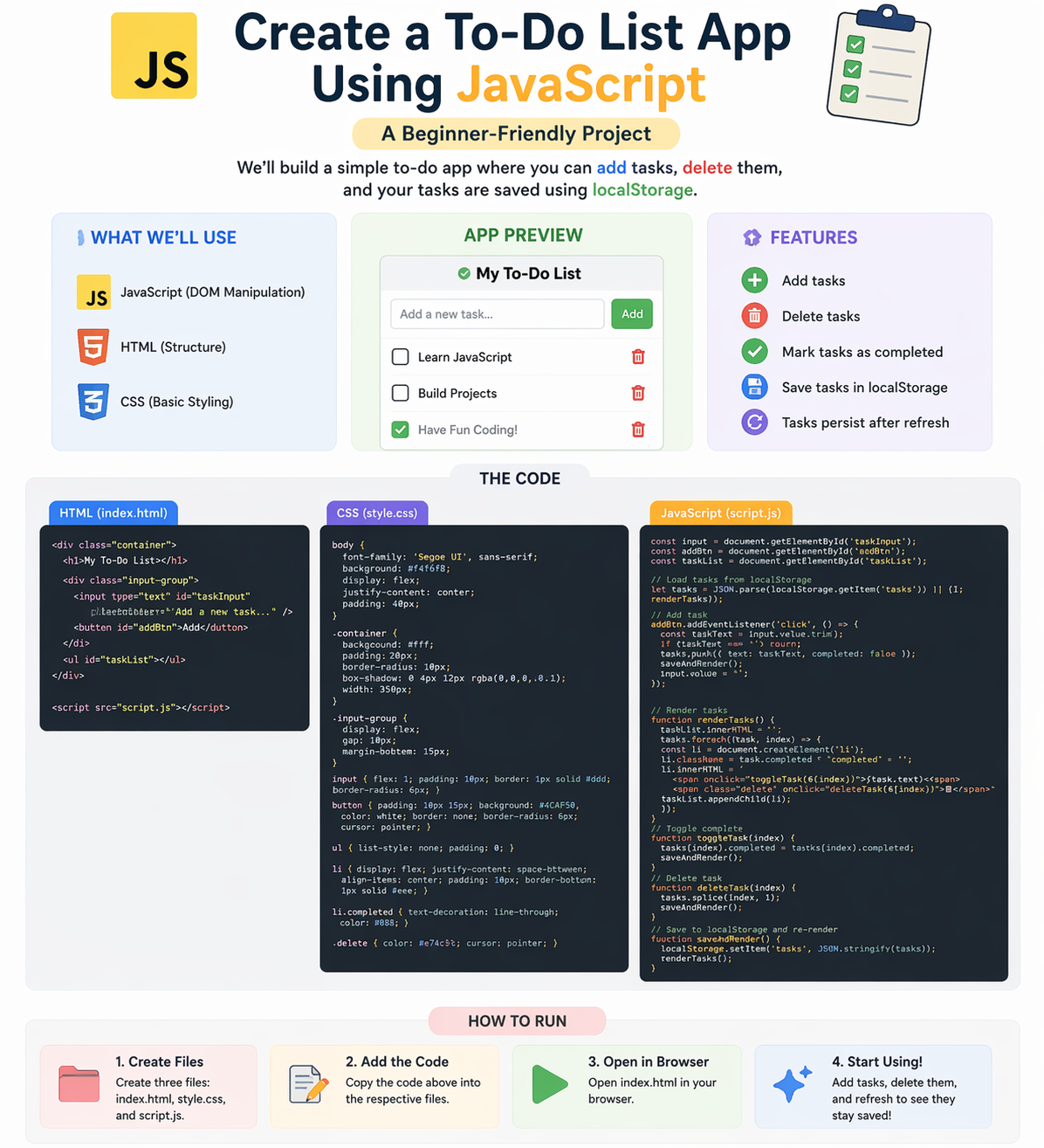
Building a To-Do List app is one of the best beginner projects to learn JavaScript. It helps you understand how real applications work using DOM manipulation, events, and local storage.
In this guide, you will learn how to build a simple To-Do List app step-by-step.
1. Project Overview
This app will allow users to:
- Add tasks
- Delete tasks
- Save tasks in browser (local storage)
2. HTML Structure (Basic UI)
Create a simple layout:
- Input field
- Add button
- Task list
👉 This forms the structure of your app
3. DOM Manipulation (Core JavaScript Concept)
DOM (Document Object Model) allows JavaScript to interact with HTML elements.
What You Will Do:
- Select elements
- Create new elements
- Update UI dynamically
👉 Example:
- Add new task to list
- Remove task from UI
4. Add Task Functionality
Steps:
- Get input value
- Create new list item
- Append it to task list
👉 Triggered when user clicks “Add” button
5. Delete Task Functionality
Steps:
- Add delete button to each task
- On click → remove task from list
👉 Helps users manage tasks easily
6. Local Storage (Save Data Permanently)
Local storage allows data to persist even after page refresh.
What to Do:
- Save tasks in local storage
- Load tasks when page reloads
👉 This makes your app more realistic
Real-World Flow
- User adds task
- Task appears in UI
- Task is saved in local storage
- On refresh → tasks are loaded again
Why Build This Project?
- Learn JavaScript fundamentals
- Understand DOM manipulation
- Practice real-world logic
Beginner Recommendation
- Start with basic UI
- Add functionality step-by-step
- Practice regularly
- Improve design later
Final Thoughts
A To-Do List app is a perfect beginner project to strengthen your JavaScript skills. Focus on logic and practice to become confident in development.
At Mango Engineers, we help students build real-world projects to become industry-ready developers.
Call to Action
Start building your first JavaScript project with Mango Engineers and improve your coding skills!