

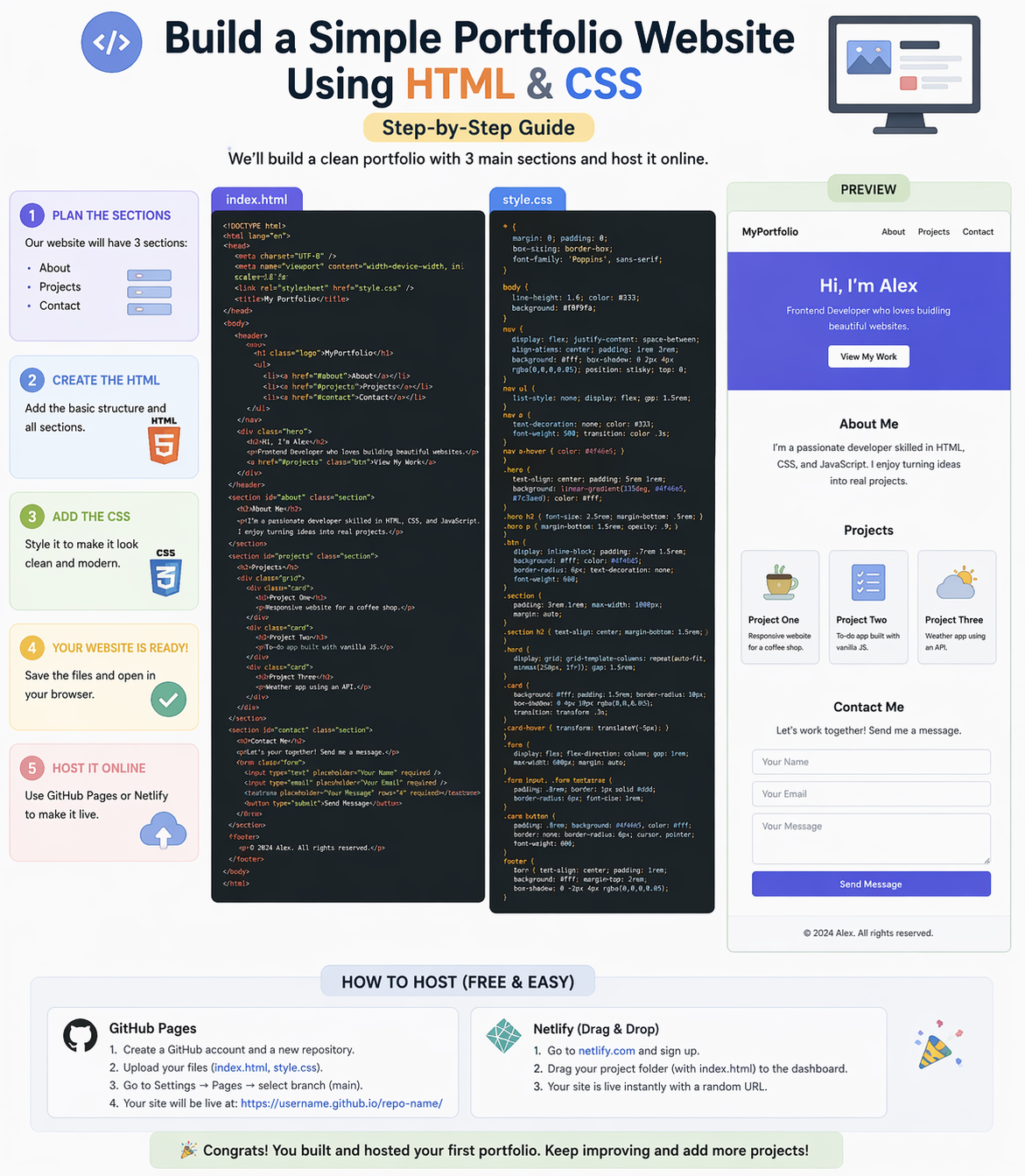
Creating a personal portfolio website is one of the best ways to showcase your skills as a developer. It helps you build your online presence and impress recruiters.
In this guide, you will learn how to build a simple portfolio website using HTML and CSS step-by-step.
1. Basic Requirements
Before starting, you need:
- Code editor (VS Code recommended)
- Basic knowledge of HTML & CSS
- Browser (Chrome)
2. Create Project Structure
Organize your files properly:
portfolio/
│
├── index.html
├── style.css
└── images/
3. Create Website Sections
Your portfolio should include the following sections:
1. About Section
- Your introduction
- Skills
- Short bio
2. Projects Section
- List of projects
- Project descriptions
- Links (GitHub / Live demo)
3. Contact Section
- Phone
- Social links
4. Build Structure with HTML
Create index.html and add:
- Header
- Sections (About, Projects, Contact)
- Footer
👉 HTML defines the structure of your website
5. Add Styling with CSS
Create style.css and design your website:
Styling Tips:
- Use clean colors
- Add spacing and alignment
- Use fonts for better readability
- Make it responsive
👉 CSS makes your portfolio attractive
6. Test Your Website
- Open in browser
- Check layout and design
- Fix errors if needed
7. Hosting Tips (Make it Live)
Free Hosting Options:
- GitHub Pages
- Netlify
- Vercel
Steps:
- Upload project
- Deploy website
- Get live link
👉 Share your portfolio with recruiters
Why Build a Portfolio Website?
- Show your skills
- Improve chances of getting a job
- Build personal brand
Beginner Recommendation
- Start simple
- Add 2-3 projects
- Keep improving design
- Update regularly
Final Thoughts
A portfolio website is your digital identity as a developer. Focus on clean design, real projects, and consistency to stand out.
At Mango Engineers, we help students build real-world projects and portfolios to become industry-ready developers.
Call to Action
Start building your portfolio with Mango Engineers and grow your career in IT!