

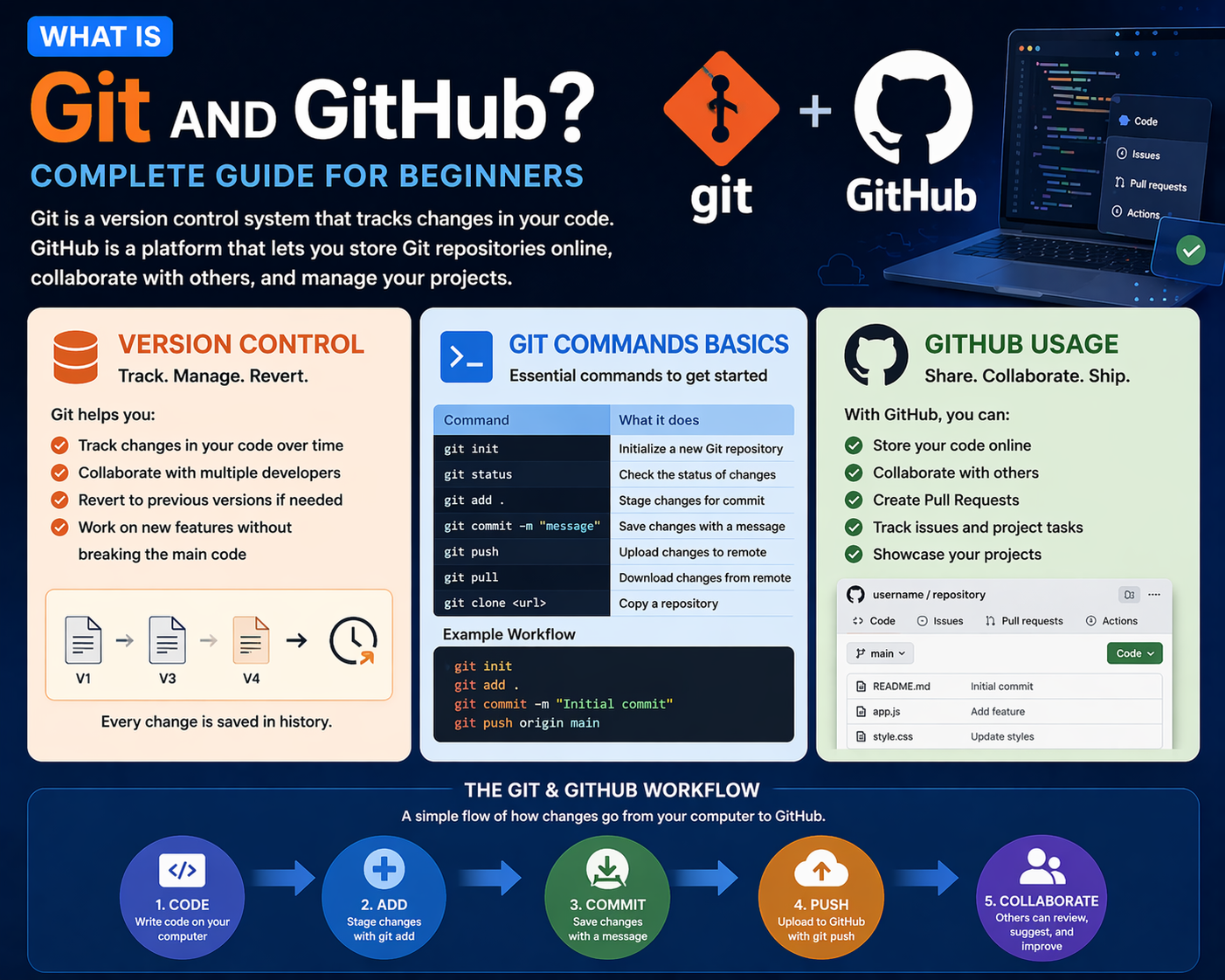
If you are starting your journey in programming or web development, you must have heard about Git and GitHub. These tools are essential for managing code, collaborating with teams, and tracking changes in projects.
Let’s understand Git and GitHub in a simple and beginner-friendly way.
1. What is Version Control?
Version control is a system that helps developers track changes in their code over time.
Why Version Control is Important:
- Keeps history of code changes
- Helps revert mistakes
- Enables team collaboration
👉 Example: Like saving multiple versions of a file so you can go back anytime
2. What is Git?
Git is a version control system used to track changes in code.
What Git Does:
- Tracks code changes
- Allows multiple developers to work together
- Manages different versions of a project
Basic Git Commands:
- git init → Initialize repository
- git add → Add files to staging
- git commit → Save changes
- git status → Check changes
- git push → Upload code
- git pull → Download updates
👉 Think of Git as the engine that manages your code history
3. What is GitHub?
GitHub is a cloud platform where you can store and manage your Git repositories online.
What GitHub Does:
- Stores code online
- Enables collaboration with teams
- Showcases your projects (portfolio)
Common GitHub Uses:
- Hosting projects
- Sharing code with others
- Contributing to open-source projects
👉 Think of GitHub as the platform where your code lives online
How Git and GitHub Work Together
- Write code on your computer
- Use Git to track changes
- Push code to GitHub
- Share and collaborate with others
Why Learn Git and GitHub?
- Essential skill for developers
- Required in most IT jobs
- Helps in teamwork and collaboration
- Builds strong developer portfolio
Beginner Recommendation
If you are new:
- Learn basic Git commands
- Create a GitHub account
- Upload your first project
- Practice regularly with small projects
Final Thoughts
Git and GitHub are must-have tools for every developer. They help you manage code efficiently and collaborate with others in real-world projects.
At Mango Engineers, we focus on practical training, real projects, and mentorship to help students become industry-ready developers.
Call to Action
Start learning Git and GitHub with Mango Engineers and build your developer portfolio today!