

Building your first website is one of the most exciting steps in your web development journey. In this guide, we will walk you through the complete process in a simple and beginner-friendly way.
1. Basic Requirements
Before starting, you need:
- A code editor (VS Code recommended)
- Basic knowledge of HTML and CSS
- A browser (Chrome)
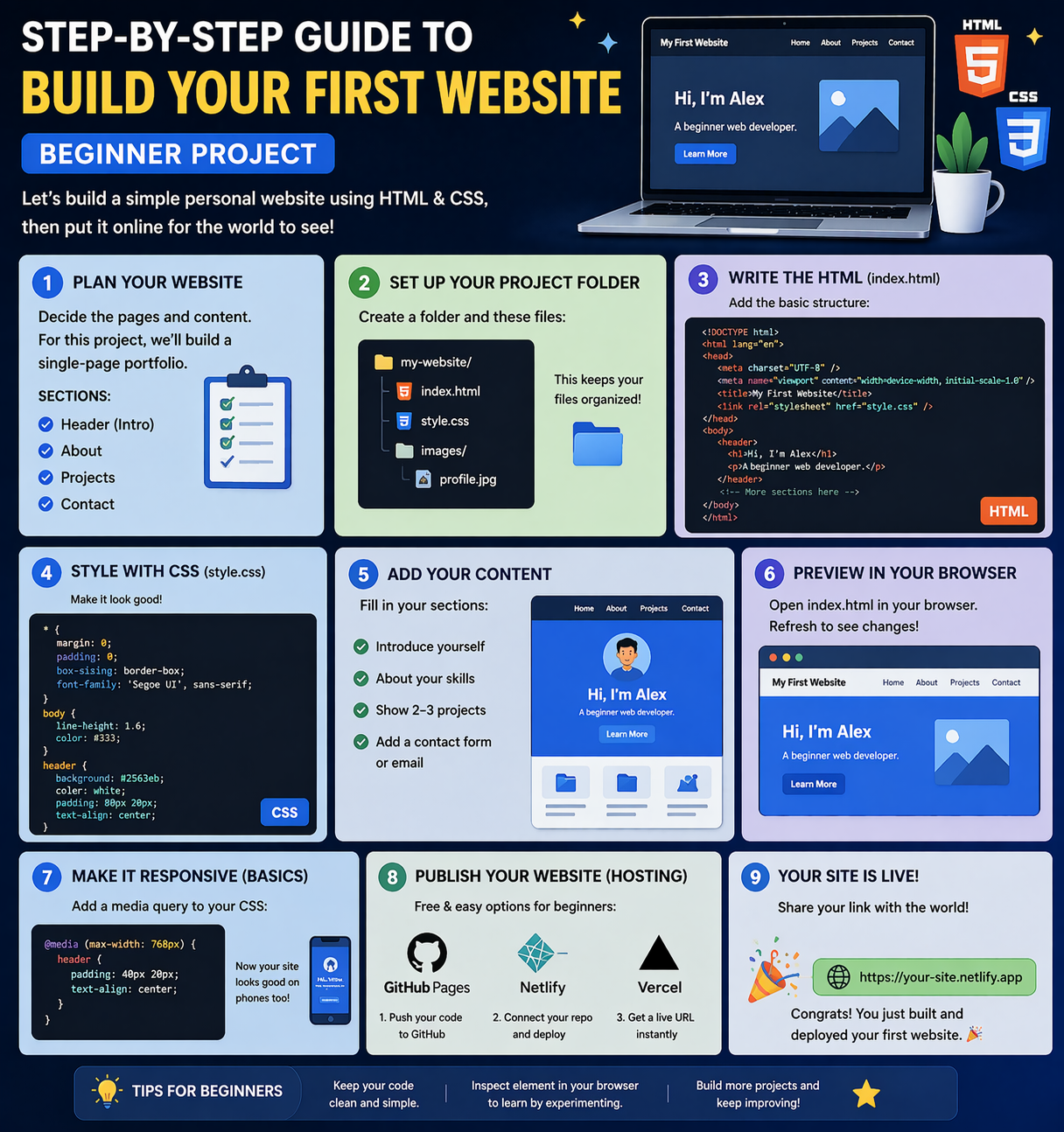
2. Create Folder Structure
Organizing your project properly is important.
Example Folder Structure:
project-folder/
│
├── index.html
├── style.css
└── images/
👉 Keep HTML, CSS, and images organized for better development
3. Build Structure with HTML
Create an index.html file and add basic structure:
- Headings
- Paragraphs
- Images
- Links
👉 HTML is the structure of your website
4. Design with CSS
Create a style.css file and link it to HTML.
What to Style:
- Colors
- Fonts
- Layout
- Spacing
👉 CSS makes your website attractive and responsive
5. Test Your Website
Open your HTML file in a browser and check:
- Layout
- Design
- Responsiveness
👉 Fix issues if something is not working properly
6. Hosting Basics (Make Your Website Live)
Once your website is ready, you can host it online.
Popular Hosting Options:
- GitHub Pages
- Netlify
- Vercel
Steps:
- Upload your project
- Deploy website
- Get live link
👉 Now your website is accessible to everyone on the internet
Why Build Your First Website?
- Builds confidence
- Strengthens HTML & CSS skills
- Creates your portfolio
Beginner Recommendation
- Start with simple design
- Practice regularly
- Build small projects
- Improve step by step
Final Thoughts
Building your first website is the foundation of your web development career. Focus on practice and real projects to improve your skills.
At Mango Engineers, we focus on practical learning, real-world projects, and mentorship to help students become industry-ready developers.
Call to Action
Start building your first website with Mango Engineers and kickstart your developer journey!