

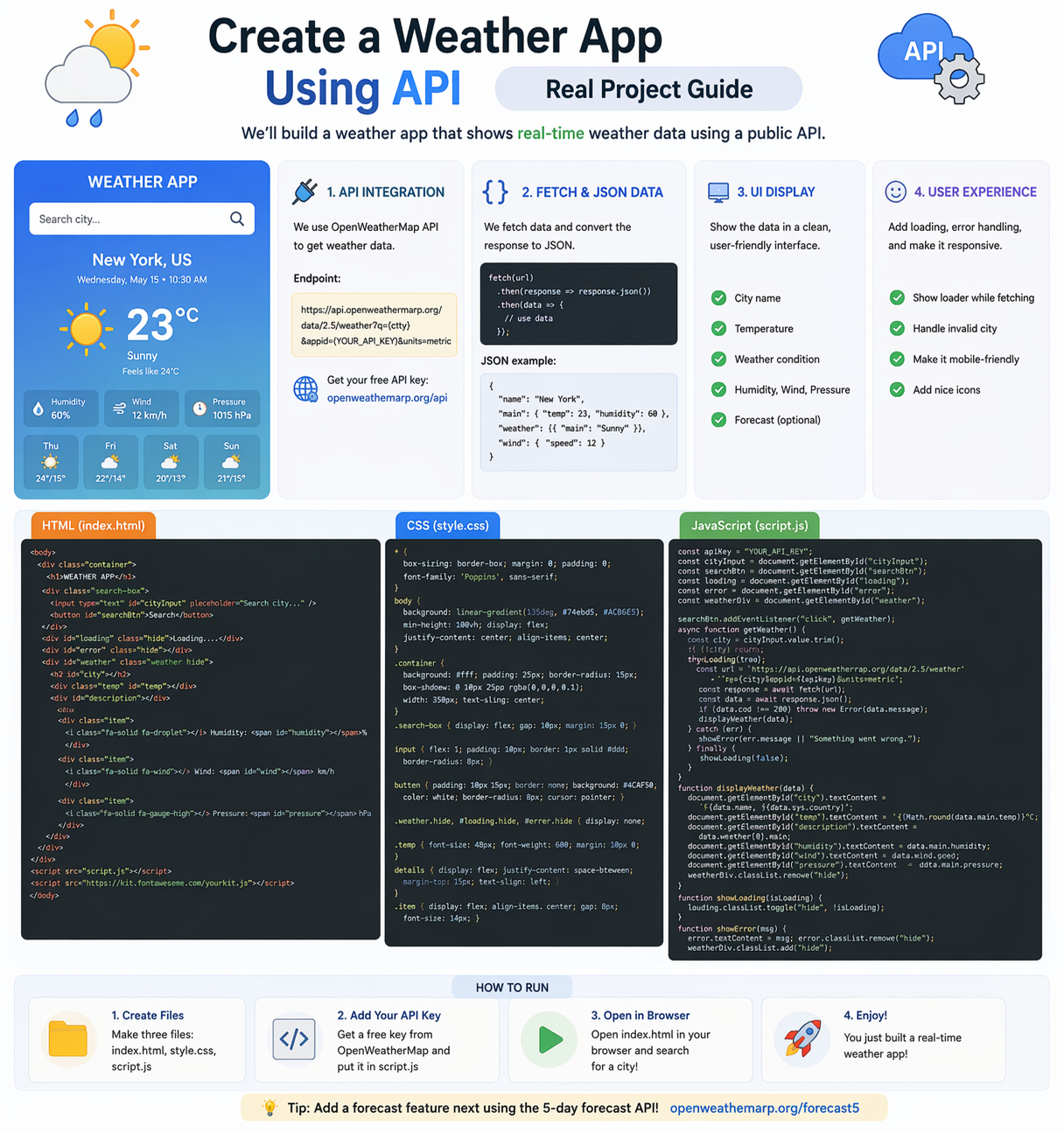
Building a Weather App is one of the best real-world projects for beginners. It helps you understand API integration, JSON data handling, and dynamic UI updates.
In this guide, you’ll learn how to create a simple weather app step-by-step.
1. Project Overview
This weather app will allow users to:
- Search for a city
- Get real-time weather data
- Display temperature and conditions
👉 This is a real-world project used in many applications
2. API Integration (Core Concept)
API is used to fetch weather data from a server.
Steps:
- Get API key (e.g., OpenWeather API)
- Create request URL
- Fetch data using JavaScript
Example:
fetch(`https://api.openweathermap.org/data/2.5/weather?q=London&appid=YOUR_API_KEY`)
👉 This connects your app to real-time data
3. Understanding JSON Data
API returns data in JSON format.
Example JSON:
{
  "name": "London",
  "main": {
    "temp": 298.15
  },
  "weather": [
    { "description": "clear sky" }
  ]
}
What to Extract:
- City name
- Temperature
- Weather condition
👉 JSON is the standard format for APIs
4. Build UI (HTML + CSS)
Create a simple interface:
Components:
- Input field (city name)
- Search button
- Weather display section
Styling Tips:
- Center layout
- Use card design
- Add spacing and colors
👉 Clean UI improves user experience
5. Display Data on Screen
Use JavaScript to update UI dynamically:
Steps:
- Get data from API
- Extract required fields
- Update HTML elements
👉 Example:
document.getElementById("temp").innerText = data.main.temp;
6. Add Event Handling
Handle user input:
Steps:
- Detect button click
- Get city name
- Call API
👉 Example:
button.addEventListener("click", getWeather);
7. Real-World Flow
- User enters city
- App sends API request
- Server returns JSON data
- Data is processed
- UI updates with weather
8. Hosting Your App
Make your app live:
Platforms:
- GitHub Pages
- Netlify
- Vercel
👉 Share your project link in portfolio
Why Build This Project?
- Learn API integration
- Understand real-world data flow
- Improve JavaScript skills
- Build portfolio project
Beginner Recommendation
- Start with basic UI
- Focus on API logic
- Improve design later
- Add more features (icons, forecast)
Final Thoughts
A Weather App is a perfect beginner-to-intermediate project. It teaches you how real applications fetch and display data using APIs.
At Mango Engineers, we focus on real-world projects and practical learning to help students become job-ready developers.
🚀 Call to Action
Start building your Weather App today and take your development skills to the next level with Mango Engineers!