

Docker is one of the most important tools in modern software development. It helps developers package applications and their dependencies into containers so they can run consistently across different environments.
In this guide by Mango Engineers, you will learn what Docker is, how containerization works, the difference between containers and virtual machines, real-world use cases, and a simple workflow.
1. What is Docker?
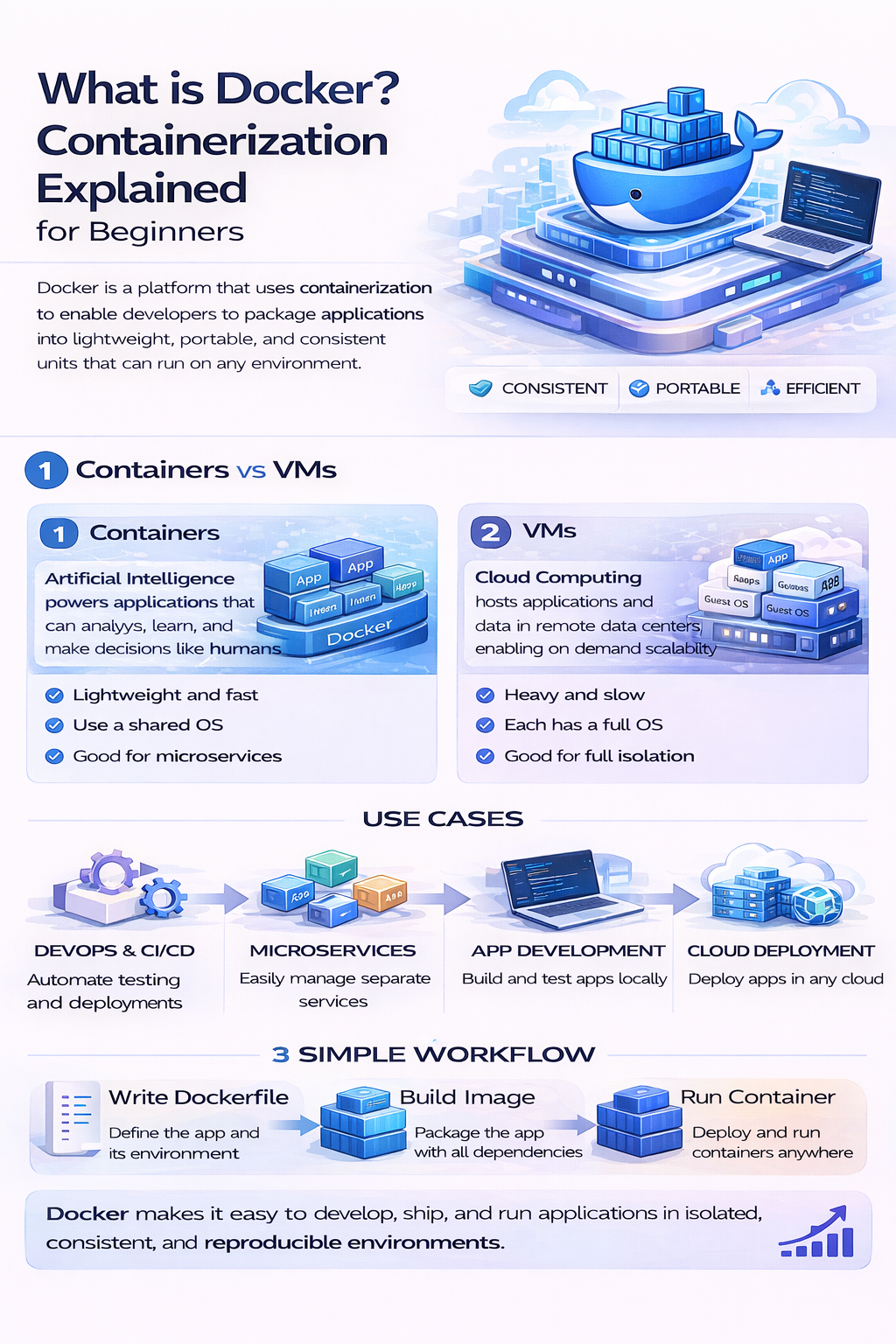
Docker is a platform that allows you to build, ship, and run applications inside containers.
In Simple Terms:
It ensures that your application works the same on your system, on your friend’s system, and on production servers.
👉 Example:
“It works on my machine” problem is solved using Docker.
2. What is Containerization?
Containerization is the process of packaging an application along with its dependencies into a single unit called a container.
Key Benefits:
- Consistent environment
- Lightweight and fast
- Easy deployment
👉 Containers share the host OS but remain isolated.
3. Containers vs Virtual Machines (VMs)
| Feature | Containers | Virtual Machines |
|---|---|---|
| Size | Lightweight | Heavy |
| Startup Time | Fast | Slow |
| Resource Usage | Low | High |
| OS | Shares host OS | Separate OS |
👉 Containers are more efficient and faster than VMs.
4. Use Cases of Docker
Docker is widely used in the industry for:
Application Deployment:
- Deploy apps consistently across environments
Microservices:
- Run multiple services independently
CI/CD Pipelines:
- Automate build, test, and deployment
Development Environment:
- Set up projects quickly without manual configuration
👉 Docker is essential for DevOps and modern backend development.
5. Simple Docker Workflow
Step 1: Write Code
Develop your application normally.
Step 2: Create Dockerfile
Define how your app should be built and run.
Step 3: Build Image
Convert your app into a Docker image.
Step 4: Run Container
Start the container from the image.
Step 5: Deploy
Run your container on servers or cloud platforms.
👉 This workflow ensures smooth development and deployment.
6. Why Learn Docker?
- Industry standard tool
- Required for DevOps roles
- Simplifies deployment
- Works well with cloud platforms
👉 Docker knowledge gives you a strong advantage as a developer.
Beginner Roadmap to Learn Docker
Step 1:
Understand basic development (frontend/backend)
Step 2:
Learn Linux basics
Step 3:
Learn Docker commands
Step 4:
Build and run containers
Step 5:
Integrate with cloud and CI/CD
Final Thoughts
Docker has revolutionized how applications are built and deployed. By learning containerization, you can build scalable and reliable applications and work efficiently in modern development environments.
Call to Action
At Mango Engineers, we help students learn Docker and DevOps with real-world projects and deployment practices.
Start your Docker journey today and become industry-ready 🚀