

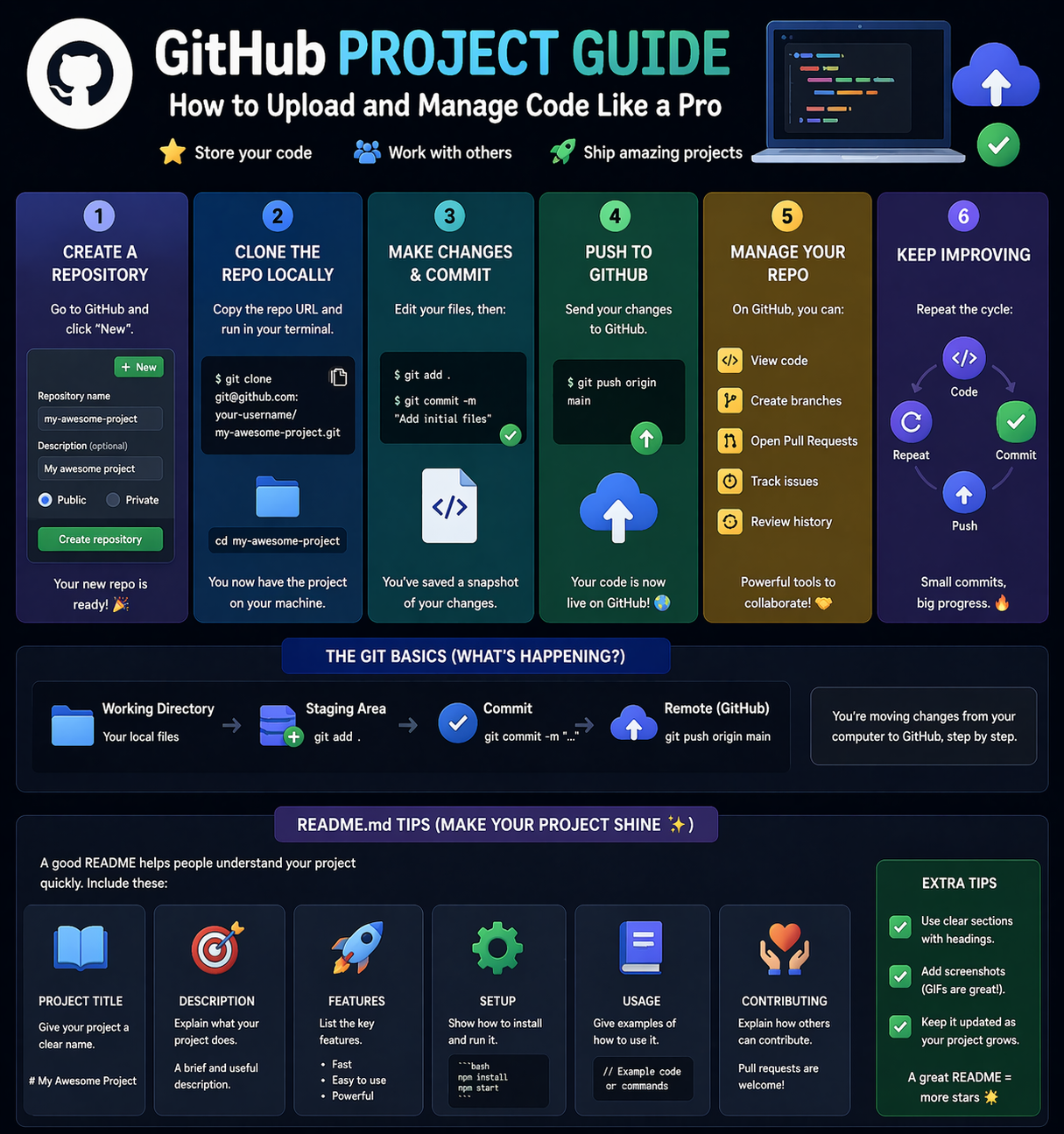
GitHub is one of the most important tools for developers. It helps you store your code, manage projects, and collaborate with others.
In this guide, you will learn how to upload and manage your code on GitHub like a pro.
1. Create a Repository (Repo Creation)
A repository (repo) is where your project code is stored.
Steps to Create a Repo:
- Go to GitHub
- Click on “New Repository”
- Enter repository name
- Add description (optional)
- Choose public or private
- Click “Create Repository”
👉 Now your project space is ready
2. Upload Code (Commit & Push)
Once your repo is ready, you can upload your code using Git.
Basic Steps:
git init
git add .
git commit -m "Initial commit"
git branch -M main
git remote add origin <repo-url>
git push -u origin main
What These Commands Do:
- git init → Initialize project
- git add → Add files
- git commit → Save changes
- git push → Upload to GitHub
👉 This process sends your code from local system to GitHub
3. Managing Code Like a Pro
Best Practices:
- Commit regularly
- Write meaningful commit messages
- Use branches for new features
- Keep your code organized
👉 Example: feature-login, bug-fix-navbar
4. README Tips (Make Your Project Stand Out)
A README file explains your project.
What to Include:
- Project title
- Description
- Features
- Installation steps
- Screenshots
- Contact details
👉 A good README improves your portfolio and visibility
Real-World Workflow
- Create repo on GitHub
- Write code locally
- Commit changes
- Push to GitHub
- Update regularly
Why Learn GitHub?
- Build strong developer portfolio
- Collaborate with teams
- Track code changes
- Required for IT jobs
Beginner Recommendation
- Create your first repo
- Upload small projects
- Practice commits daily
- Improve README quality
Final Thoughts
GitHub is more than just a code storage platform—it is your online portfolio. Learning how to manage your code properly can boost your career opportunities.
At Mango Engineers, we focus on practical learning, real-world projects, and mentorship to help students become industry-ready developers.
Call to Action
Start uploading your projects on GitHub with Mango Engineers and build a strong developer profile!